Login
Jul 22, 2026
AI Anime
How to Create an Anime with AI: From Story Idea to Final Video
A complete AI anime workflow for turning a story idea into consistent characters, cinematic video clips, and a polished final edit—with copyable prompts for every stage.
How to Create an Anime with AI: From Story Idea to Final Video
0:00/0:00

Creating an anime scene with AI is no longer just about generating a few attractive images. If you want the finished video to feel consistent, cinematic, and intentional, you need a production workflow.

Import these assets into your own session
Create a new Yapper session with five finished character sheets, two ball references, and the stadium already organized and ready to use.
Messi anime character sheet included in the session
Messi
Yamal anime character sheet included in the session
Yamal
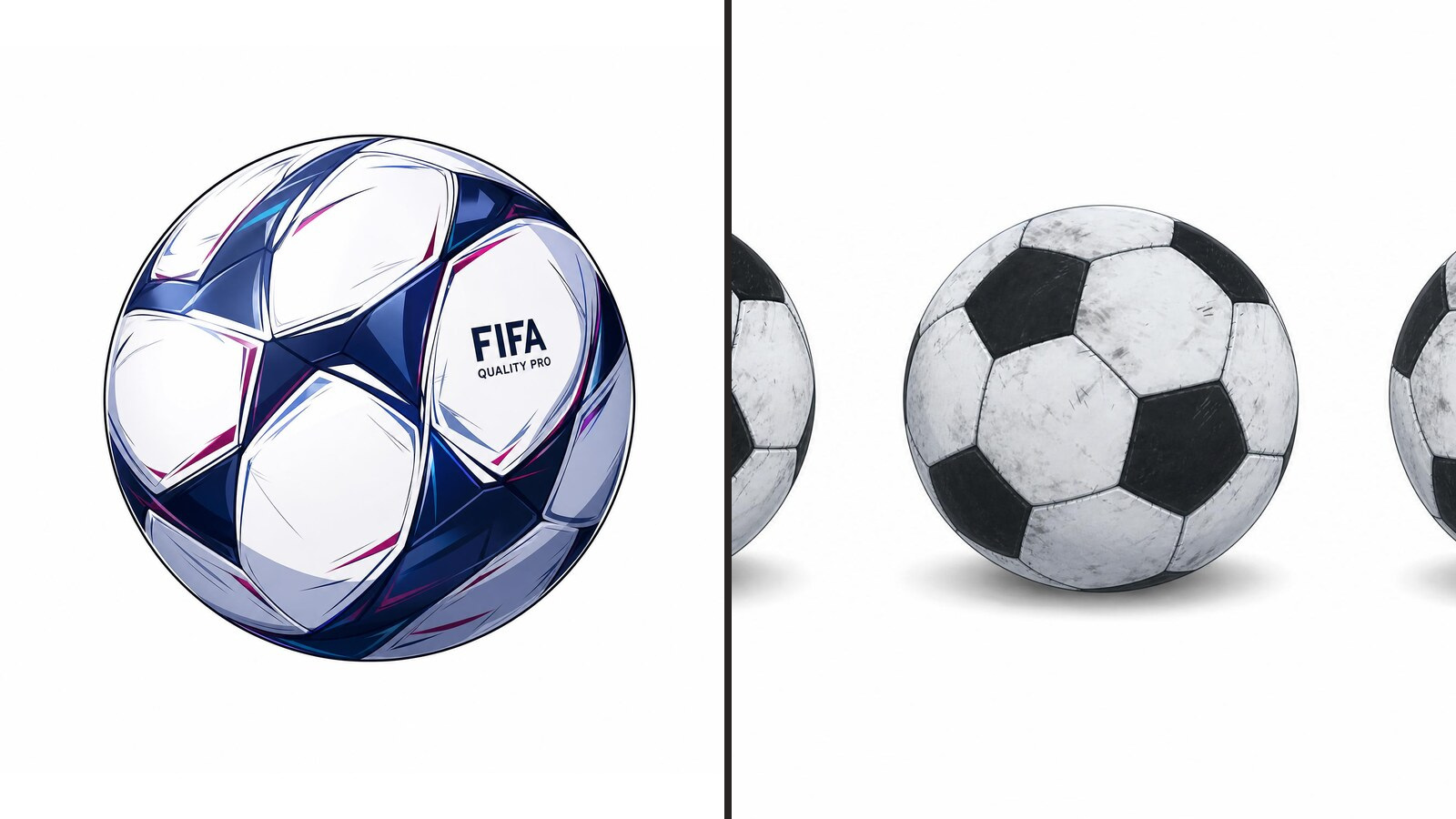
Anime match ball reference included in the session
Match ball
Night stadium location reference included in the session
Stadium

In this guide, I’ll walk you through the process I used to create the AI football anime above—from the first story idea to the final edit. You’ll also find copyable prompts throughout the article, so you can adapt the same workflow to your own project in Yapper.

For this project, I imagined a fictional final between Argentina and Spain. The concept was inspired by the well-known childhood photograph of Lionel Messi with Lamine Yamal: almost 20 years later, they meet again—not for a photograph, but as opponents fighting for the final goal. Julián Álvarez and Pedri appear as supporting characters.

If you use real people as creative references, make sure your use follows the generation platform’s policies and any applicable likeness or publicity rights. Clearly label fictional AI-generated scenes, especially when you publish them.

The workflow has three stages:

  1. Pre-production: Write the story and build reusable references.
  2. Clip generation: Turn the script into short, controllable shots.
  3. Post-production: Select the best moments, repair continuity, and shape the final sequence.

Part 1: Pre-Production

Pre-production is where you prepare everything the AI will need later:

  • The story and script
  • Character designs and element sheets
  • Location references
  • Recurring props
  • Uniforms and other continuity details
  • The overall visual language

Spending more time here usually saves both time and generation credits later.

Step 1: Develop the Story

You do not need to begin with a perfectly formatted screenplay. Start by explaining:

  • Who the characters are
  • What happens in the scene
  • What the central conflict is
  • How the scene should end
  • What the audience should feel

Yapper Assistant can turn those ingredients into a structured script that is easier to divide into shots.

Prompt: Turn a Story Idea Into an Anime Script

Write a one-minute anime football script about Messi, Yamal, Pedri, and Julián Álvarez. Messi starts by dribbling the ball, but Yamal blocks him. This triggers a flashback to Yamal as a child watching Messi play and saying, “One day, I’ll play on the same field as you.” Back in the present, Pedri passes to Yamal, who takes a shot, but Messi blocks it. End the scene there. Keep the script concise, emotional, and dramatic.

For my project, I gave the assistant only the Messi-versus-Yamal premise. It organized the idea into a complete sequence that I could later divide into individual clips.

Once your script is ready, save it. You will return to it during video generation.

Step 2: Create the Main Character Designs

This project has four important characters:

  • Lionel Messi
  • Lamine Yamal
  • Julián Álvarez
  • Pedri

Start with one clear reference image for each character. A useful reference should have good lighting, a clear face and hairstyle, recognizable clothing, minimal obstruction, and a camera angle that reveals the character’s proportions.

Prompt: Turn a Reference Photo Into an Original Anime Character

Using the uploaded photograph as the identity reference, create an original anime character design based on this person. Keep the facial features, hairstyle, expression, clothing, and overall identity recognizable, but reinterpret them with sharp linework, dramatic eyes, stylized proportions, bold cel shading, and the energy of a high-stakes supernatural shōnen series. Use an original visual treatment rather than copying a specific artist or franchise.

Generate several versions before choosing one. Check each result for:

  • Facial resemblance
  • Accurate hair and clothing
  • A consistent visual style
  • Reusable body proportions
  • Clear details that will survive different poses and camera angles

Image generation is usually less expensive than video generation, so this is the best stage for exploration. A strong character reference improves almost every shot that follows.

Step 3: Build an Element Sheet

A single portrait gives the model only one view. Later, you may need to show the same character from the front, side, back, or a three-quarter angle.

An element sheet provides those views in one reusable reference. It gives the model more information about the face, hairstyle, clothing, silhouette, and body proportions, which makes continuity easier to maintain.

Open the Element Sheet Generator, add your chosen character image, and create an element sheet for every recurring character.

Do not skip this step. Element sheets are among the most useful assets in a character-consistency workflow.

Step 4: Match Every Character to the Same Style

Once the first character is finished, use that design as the style anchor for the rest of the cast.

For example, when creating Yamal, I used:

  • A real photograph of Yamal as the identity reference
  • The finished Messi anime design as the style reference

The photograph tells the model who the character should resemble. The finished design tells it how the new character should be drawn.

Prompt: Match a Second Character to the Established Style

Use Image A as the visual style reference and transform Image B to match it. Keep the person in Image B recognizable, including their facial features, hairstyle, pose, clothing, and overall appearance, but recreate them with the same anime linework, shading, proportions, color treatment, and level of detail as Image A. The final result should look like the person from Image B naturally belongs in the same anime world as Image A.

Repeat this process for every important character.
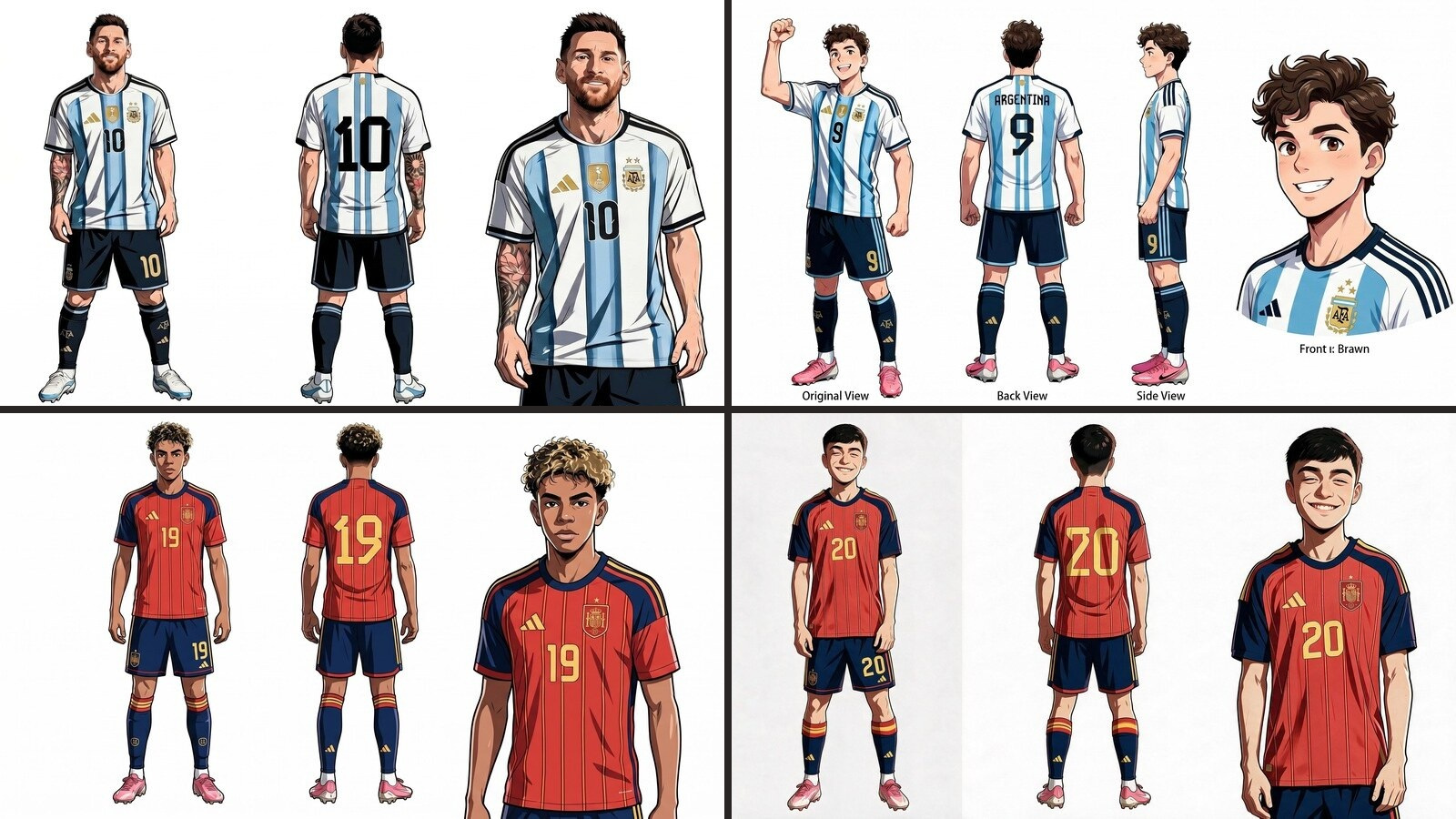
The four finished character element sheets used to keep Messi, Álvarez, Yamal, and Pedri consistent across the anime.

Step 5: Make the Uniforms Consistent

My first character set used several different versions of the national-team uniforms because the source photographs came from different seasons. Those differences became obvious as soon as the characters appeared together.

I used the finished Messi design as the outfit reference for Álvarez, and the finished Yamal design as the outfit reference for Pedri. That gave the Argentina players one shared uniform and the Spain players another.

Prompt: Replace Only the Uniform

Use Image A as the main reference for the character, pose, and anime art style. Replace only the uniform in Image A with the uniform shown in Image B, including its colors, patterns, and construction details. Keep everything else from Image A unchanged, and make the new uniform blend naturally with the same linework, proportions, lighting, and shading. Do not add or reproduce logos unless I have the right to use them.

Step 6: Create the Location

The story takes place inside a huge football stadium at night. For a reusable location reference, create a wide establishing shot rather than a close-up.

A wide image gives the model information about the pitch, stands, stadium architecture, lighting, screens, tunnels, crowd placement, scale, and the spatial relationship between different areas.

Prompt: Generate an Anime Football Stadium
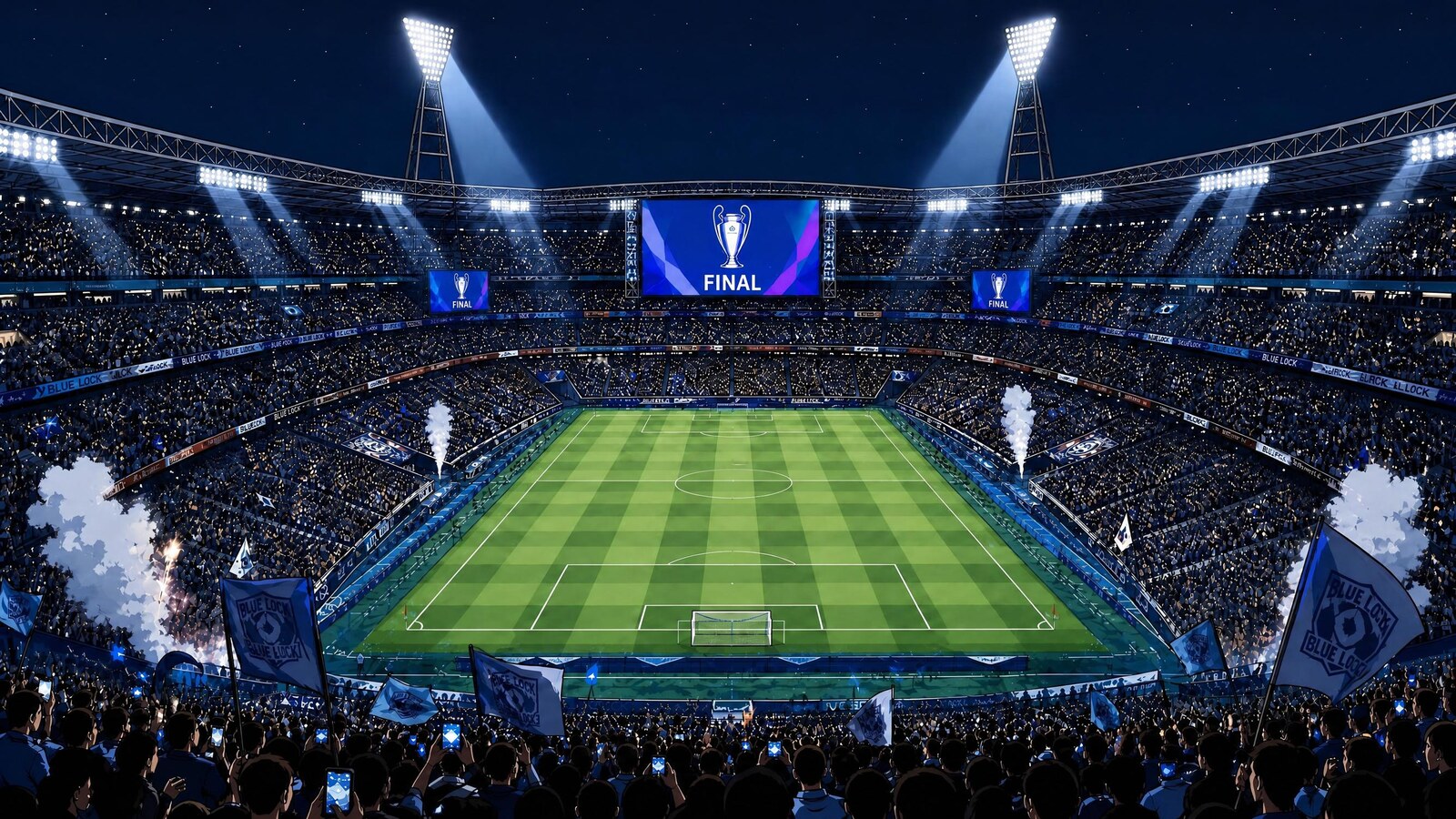
Generate a massive international-final football stadium at night in an original high-energy shōnen anime aesthetic. The stands are packed with an energetic crowd, but the pitch is completely empty—no players, referees, coaches, or staff. Use bold linework, dramatic floodlights, deep cinematic shadows, and a grand sense of scale. The stadium should feel ready for the deciding match of a world championship. No text, logos, or trademarks.
The wide stadium reference used to anchor the pitch, lighting, crowd, and architecture across different camera angles.

Step 7: Prepare Recurring Props

Props are easy to overlook. Most creators focus on characters and backgrounds, but recurring objects can drift between shots too.

For this story, I prepared a younger version of Yamal, the match ball, and the worn childhood ball from the flashback.

Prompt: Create the Younger Character
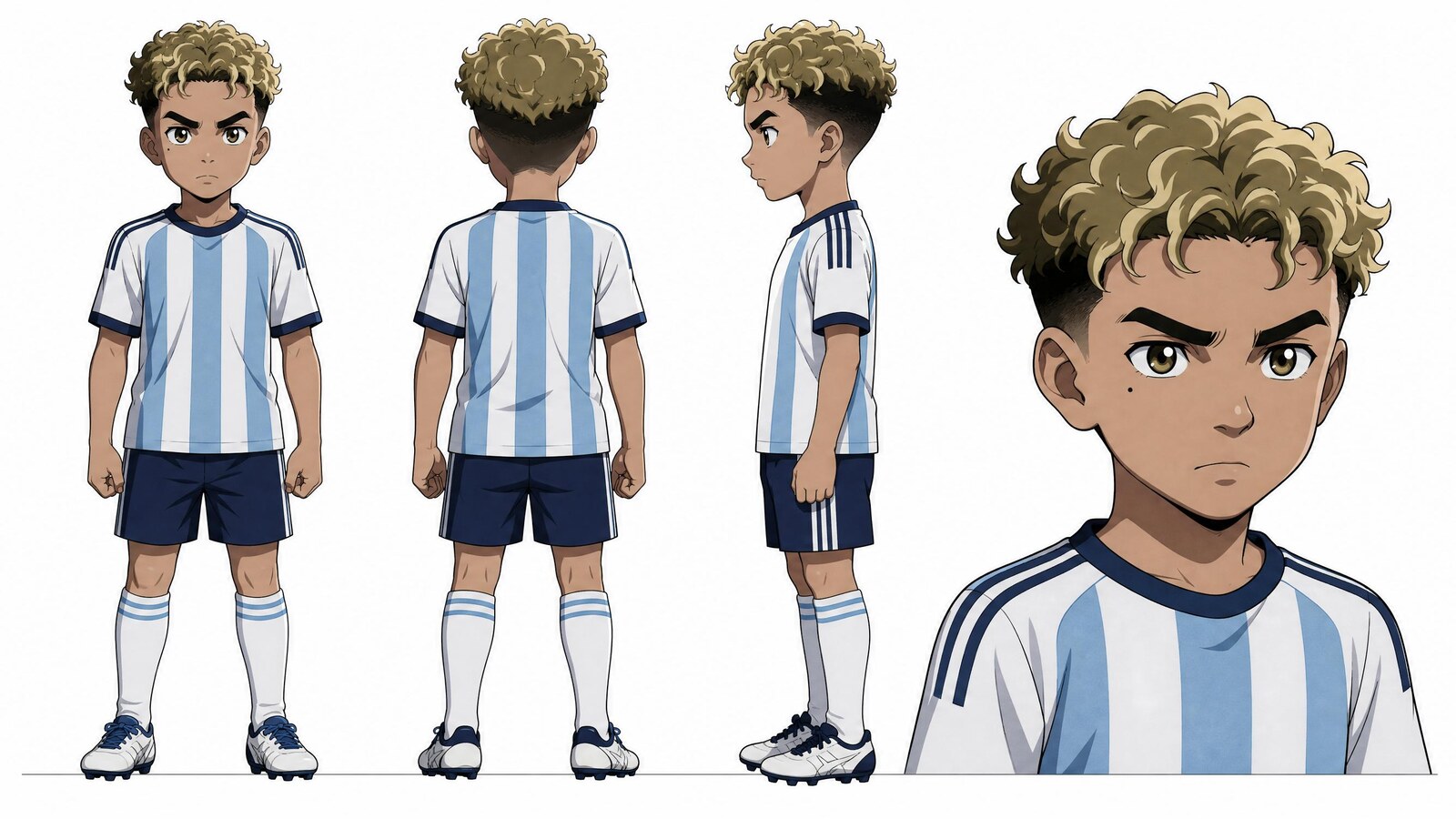
Generate an eight-year-old version of the character in the reference image. Keep the same recognizable facial structure, hairstyle, skin tone, and overall identity, but adjust the face, height, and body proportions naturally to look like a young child. Preserve the exact anime linework, shading, palette, and level of detail from the reference.
A multi-angle element sheet for the younger character used in the flashback scene.

Prompt: Create the Match Ball

Generate a clean professional football for a major international final in the same anime art style as the reference image. Show realistic panel construction, sharp linework, and consistent cel shading. Keep the design original, with no logos, brands, or text.

Prompt: Create the Childhood Ball

Generate an old football belonging to an eight-year-old street player. The ball should look heavily used, with mud stains, faded colors, scratches, worn panels, and years of visible play. Render it in exactly the same anime art style as the reference image. No logos, brands, or text.
The clean match ball and worn childhood ball prepared as separate recurring prop references.

At this point, your production kit is ready: script, characters, element sheets, stadium, uniforms, and props.

Part 2: Generate the Anime Clips

The goal of this stage is not to generate one perfect finished video. It is to create enough usable footage to construct the final sequence during editing.

Treat each generation like a shot or a small group of shots. Keep the cast, environment, props, camera, action, dialogue, sound, and timing in separate sections so the model does not have to guess what each reference controls.

Scene 1: Messi Dribbles and Yamal Wins the Ball

References: Use @night-stadium for the night stadium. Use @messi for Messi, @lamine-yamal for Yamal, and @match-ball for the exact match ball. Camera: Begin with a low tracking shot following Messi’s dribble. Hard cut into slow motion as Yamal slides in, then push into tight, symmetrical close-ups of both faces. Action: Messi dribbles calmly downfield. Yamal slides low, knocks the ball away, keeps it close, and rises. Time slows. Messi looks down at the ball and then up at Yamal with a faint, knowing smile. Dialogue: Messi says in Japanese, calm and amused: “大きくなったな。” Yamal replies in Japanese, fierce and defiant: “今日、お前を倒してみせる。” Audio: Crowd noise fades under the slow-motion beat. A low dramatic tone swells beneath the dialogue. Diegetic sound; no music. Style: Original dramatic shōnen sports anime, high-contrast lighting, bold speed lines. Avoid: Static camera, identity drift, uniform changes, extra players entering the foreground. Timing: [0–4s] Low tracking shot; Messi dribbles and Yamal steals the ball. [4–8s] Slow-motion close-up on Messi delivering his line. [8–11s] Tight close-up on Yamal delivering his reply.

Scene 2: Yamal’s Childhood Flashback

References: Use @messi for the adult player shown on television, @young-yamal for eight-year-old Yamal, and @worn-ball for the worn football. Scene: A dim living room at night. A television glows with an anime football highlight. Young Yamal sits close to the screen, gripping the scuffed ball, his eyes fixed on the match. Camera: Slowly push toward the television, then hard cut to a close-up of the boy’s face lit by the screen. Action: The boy watches the highlight, tightens his grip on the football, and leans forward. Dialogue: He whispers in Japanese, quietly and with resolve: “いつか必ず……あなたと同じピッチに立ってみせる。” Audio: Quiet room tone and faint, muffled television commentary beneath the whisper. Diegetic sound; no music. Style: Match the established shōnen anime character and environment references. Avoid: Photorealism, live-action texture, 3D rendering, garbled dialogue, changes to the child’s face or ball. Timing: [0–3s] Push in on the television highlight. [3–6s] Cut to the child’s screen-lit face as he grips the ball and whispers his vow.

Scene 3: Pedri Wins Possession

References: Use @night-stadium for the night stadium, @pedri for Pedri, @julian-alvarez for Álvarez, @lamine-yamal for Yamal, and @match-ball for the ball. The score is 1–1. Camera: A low, fast tracking shot skims the pitch. Whip-pan to follow the pass across the field. Action: Pedri intercepts the ball from Álvarez at midfield with a sharp tackle, plants his foot, and drives a first-time pass across the pitch. Yamal receives it in full stride. Audio: Stadium crowd and on-pitch effects only. No music. Style: Dramatic shōnen sports anime with bold linework, speed lines, and dynamic tilted framing. Avoid: Static camera, identity drift, changing uniforms, duplicated players. Timing: [0–3s] Pedri slides in and takes the ball from Álvarez. [3–6s] Pedri fires the pass and the camera follows it. [6–8s] Yamal receives the ball at full sprint.

Scene 4: Yamal Takes the Shot

References: Continue in @night-stadium. Use @lamine-yamal, @messi, @pedri, @julian-alvarez, and @match-ball for the established cast and match ball. Camera: Push close on Yamal’s face, whip-pan with the shot, then cut to Messi meeting the ball in midair. End on a close-up of Messi. Action: Yamal smiles with fierce confidence and strikes hard toward goal. Before the ball reaches the net, Messi leaps and extends his leg into its path. The ball presses against his leg for a stylized beat of visible resistance as he holds firm. Dialogue: Yamal shouts in Japanese: “この瞬間を……ずっと、待っていた!” Messi replies in Japanese, dry but impressed: “ほう……このガキ、強くなったもんだ。” Audio: Crowd roar and impact effects only. No music. Style: Dramatic shōnen sports anime with bold speed lines, dynamic framing, and exaggerated impact. Avoid: Static camera, identity drift, extra limbs, or changes to the ball and uniforms. Timing: Close push-in on Yamal as he delivers his line and shoots. Messi lunges into the ball’s path. Cut close on Messi delivering his reply.

Scene 5: The Deflection and Standoff

References: Use @night-stadium for the same field-level night stadium, @lamine-yamal for Yamal, @messi for Messi, and @match-ball for the exact match ball. Camera: Begin with a wide action shot of the deflection. Hard cut to a wide, symmetrical standoff, then use medium shots that favor silhouette and posture over facial detail. End on a slow-motion hold of the ball against the sky. Action: Messi overpowers the ball’s momentum and sends it rocketing straight upward. Cut to Messi and Yamal standing several meters apart near the edge of the pitch. Yamal is tense and coiled, staring forward. Messi stands relaxed, arms loose, with a faint, proud smile. High above them, the ball spins slowly against the night sky. Audio: The crowd fades to near silence during the standoff. Use only a low ambient wind beneath the final slow-motion hold. Style: Original stylized shōnen sports anime, exaggerated action, bold cel shading, painterly night sky. Avoid: Dialogue, photorealistic faces, identity drift, extra foreground characters, or a completely static standoff. Timing: [0–3s] Messi launches the ball upward. [3–6s] Wide symmetrical standoff. [6–9s] Medium shot on Yamal. [9–11s] Medium shot on Messi. [11–15s] Ball spinning alone against the night sky.

Generate more than one version of each scene. A failed face in one take may be paired with a perfect camera move in another, and you can combine the strongest fragments during editing.

Part 3: Post-Production

Bring every generated clip into your editing software and treat it as raw footage—not as a finished scene.

Build the Sequence From the Best Moments

Split each clip into smaller shots, remove broken or inconsistent frames, and combine the strongest moments from different variations. Arrange the edit around story, pacing, continuity, and emotion.

Avoid cutting between shots with nearly identical framing. Alternating wide shots, close-ups, inserts, and reaction shots creates clearer visual rhythm.

When an important beat is missing, generate only that insert instead of recreating the entire scene. Useful inserts include:

  • The ball spinning or hitting the turf
  • A player’s eyes
  • Boots planting or sliding
  • Hands tightening
  • Crowd reactions
  • Flags, lights, or a scoreboard

Make the Flashback Instantly Readable

Use a subtle white flash, a warmer grade, a soft glow, or reduced crowd sound to separate the flashback from the present. One or two consistent cues are enough; too many effects can make the transition feel artificial.

Add an Original Soundtrack

Once the picture edit is stable, you can use Yapper Assistant to develop an original track for the sequence.

Generate an original Japanese, high-energy anime football theme song about chasing a lifelong dream, overcoming fear, representing your nation, and fighting to win a world championship. Make it emotional, heroic, fast-paced, and cinematic, with powerful vocals and a huge, memorable chorus. Do not imitate an existing song, composer, or franchise.

Mix the track around the dialogue and impact sounds rather than covering them. The quiet standoff at the end will feel more powerful if the music makes room for it.

The complete post-production loop is simple:

Generate, split, remove, rearrange, add missing inserts, and polish.

Create Your Own AI Anime

You can reuse this workflow for much more than football:

  • Sports anime
  • Fantasy battles
  • Music videos
  • Short films and trailers
  • Historical stories
  • Product campaigns
  • Social-media series
  • Vertical micro-dramas
  • Character-driven episodes

Start with a simple idea, build strong references, generate several variations, and treat every output as production material rather than a finished result.

Ready to create your own anime?

Develop the story with Yapper Assistant, build your reference kit, and turn each scene into a controllable AI video clip.