
Creating a music video traditionally requires a lot of resources. You need a song, actors, locations, camera equipment, a production crew, and a proper shooting schedule. But with the development of AI tools, the process of creating a music video has changed completely.
In this tutorial, I will show you how I created my own song and transformed it into a complete AI-generated music video using tools like Suno and Seedance 2.5. I will walk you through my entire workflow, from creating the song, designing the characters, and generating cinematic scenes, to finally editing everything together into a finished music video.
I have also included the prompts that I used throughout this project below, so you can follow the same workflow and experiment with creating your own AI music video.
Creating the Song with Suno
The first step of creating any music video is having a song.
For this project, I started by creating a simple vocal idea and using Suno to help generate the final track. The purpose of the original recording was not to create a perfect vocal performance, but to give the AI a reference for the melody, rhythm, and overall feeling that I wanted.
After uploading the audio into Suno, I experimented with different music styles until I found something that matched the direction of the video. For this project, I wanted the song to feel bright, energetic, youthful, and slightly nostalgic, so I focused on a pop style with a strong and memorable melody.
Once I had the final version of the song, I exported the audio and used it as the foundation for the music video.
Designing the Characters Before Creating the Video
One of the most important steps in AI video generation is creating consistent characters.
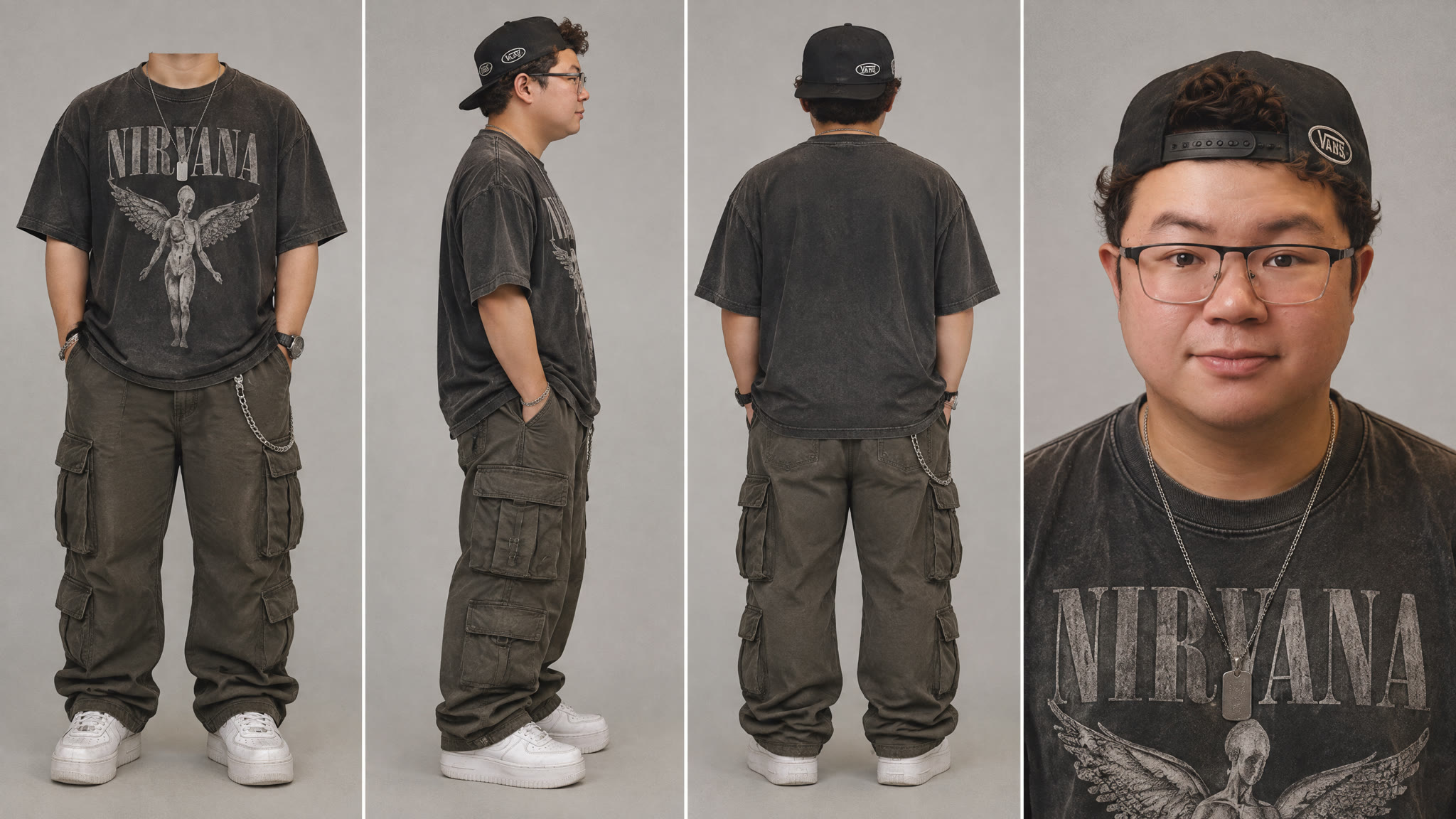
Before generating a single clip, I made a four-panel element sheet for every character: a headless full-body front view, a side profile, a back view, and a medium close-up. Attaching these sheets to every video prompt is what keeps the same four friends recognizable from the street to the convenience store to the tent party.
Early 2000s Character Sheet
This one is me. Attach your own photo as the reference image, and the sheet keeps your face while dressing you in early-2000s streetwear.
The Rest of the Group
The other three friends don't need a reference photo. The prompts describe each person and outfit from scratch. My first versions looked a little painted and had visible brand logos, so these final prompts ask for a natural film-camera look and no brand names.


Generating Cinematic Shots with Seedance 2.5
Once the characters and scenes were prepared, I moved into Seedance 2.5 to generate the video clips.
For each scene, I focused on writing detailed prompts that described the subject, action, environment, camera movement, and visual style. The more specific the instructions are, the easier it is for the AI to understand the intended result.
For this project, I wanted to create a nostalgic early-2000s music video feeling. Before generating anything, I gave the AI agent the look I wanted so it would keep every scene consistent:
I also added a subtle VHS-inspired style during the editing process. The goal was not to heavily distort the footage with effects, but to add small imperfections that make the AI-generated scenes feel like they were captured with a real camera.
Small details such as film texture, handheld movement, and natural color adjustments can make a big difference in making AI footage feel more authentic.
Every clip below was generated with Seedance 2.5 at 16:9 and 480p. Attach the four character sheets as reference images 1 to 4 for every scene except the b-boy clip, which uses no references.
Skating Down the Street

Convenience Store Hangout

Parking Lot Sprint
Short clips like this one make good cutaways between longer scenes. The prompt asks for about two seconds of action, and I trimmed the best moment in the edit.

Playing with a Flip Phone

Room Party

Locker Hangout

Tent Party (Slow Shutter POV)
For the second half of the video, the group moves to a tent party. These prompts bring in a crowd of extras around the four main characters. This clip has the heavy, smeared motion blur of a slow shutter and a camera that feels like it's being carried through the crowd.

Shuffle

B-Boy Breakdancing
This clip doesn't use the character sheets at all. A random performer and crowd are exactly what a party cutaway needs.

Putting It All Together
Creating an AI music video is not simply about generating one prompt and getting a finished result. The biggest difference comes from the creative process behind it.
The workflow is similar to traditional filmmaking: create the concept, design the characters, plan the scenes, generate the footage, select the best shots, and edit everything together.
With tools like Suno and Seedance 2.5, creators now have the ability to produce music videos and cinematic scenes that would previously require a much larger production budget.
Try the AI agent now and start creating your own music video!