Aug 4, 2026
AI Filmmaking
How to Create an Ultra-Realistic Short Film with AI
A complete AI short-film workflow for creating consistent characters, cinematic locations, realistic video clips, and a polished final edit on a limited budget.
How to Create an Ultra-Realistic Short Film with AI
0:00/0:00

Today, we are recreating the look and feel of a $39,000 short-film production without spending anything close to a professional production budget.

AI video generation has made cinematic filmmaking more accessible, but it can still become expensive quickly. Unnecessary generations, weak prompts, inconsistent scenes, and an inefficient workflow can burn through credits before you have enough usable footage to finish a film.

The good news is that you do not need an unlimited budget. The film above was built with a focused production kit, short controllable generations, and a traditional edit. Whether you are a filmmaker, content creator, video editor, or complete beginner, you can adapt the same workflow to your own story in Yapper.

The process has four parts:

  1. Build consistent character references.
  2. Create cinematic location references.
  3. Generate the story as a sequence of short clips.
  4. Edit the best moments into one finished film.
これらの素材を自分のセッションに読み込む
完成済みのリファレンス16点と未編集のシーン生成例3点を整理した新しいYapperセッションを作成します。
Pirate captain character reference included in the session
Pirate
Pirate cabin location reference included in the session
Cabin
Ostrich-mounted bandit reference included in the session
Bandits
Glowing watch prop reference included in the session
Watch

Part 1: Create Character Element Sheets

Before generating any scene, create an element sheet for every recurring character. This is one of the most important steps in the AI filmmaking process, so do not skip it.

You can ask Yapper Assistant to design a character and then create a reference sheet containing:

  • A full-body front view
  • A full-body side view
  • A full-body back view
  • A medium close-up of the face

These perspectives give the video model enough visual information to understand the character's clothing, proportions, silhouette, and facial features. That makes it much easier to maintain the same identity from one shot to the next.

Keep Only One Face on the Sheet

It may seem helpful to show the character's face in every view, but several faces on the same sheet can sometimes compete with one another. A cleaner approach is to crop the front, side, and back views at the neck and keep one unobstructed close-up as the identity reference.

Prompt: Create a Photorealistic Character Element Sheet

Photorealistic character element sheet on one neutral light-gray studio backdrop, four separate views of the same man laid out from left to right: full-body front view, full-body side profile, full-body back view, and a chest-up close-up. Use the identity from @character. Framing: Crop the front, side, and back full-body views at the neck so only the outfit and body are visible. Keep all three on the same ground line, at the same height and scale. The fourth panel is a larger chest-up close-up that shows the full head and face for identity. Style: Photorealistic studio photography, natural fabric and skin texture, soft even key lighting, gentle contact shadows under the feet, and true-to-life color. No text, labels, title, or captions. Include only a tiny unobtrusive height-reference tick beside the front view.

For this film, the same hero needed different wardrobe anchors for the pirate, desert, and jungle sections. Supporting characters and the larger pirate crew received their own references too.
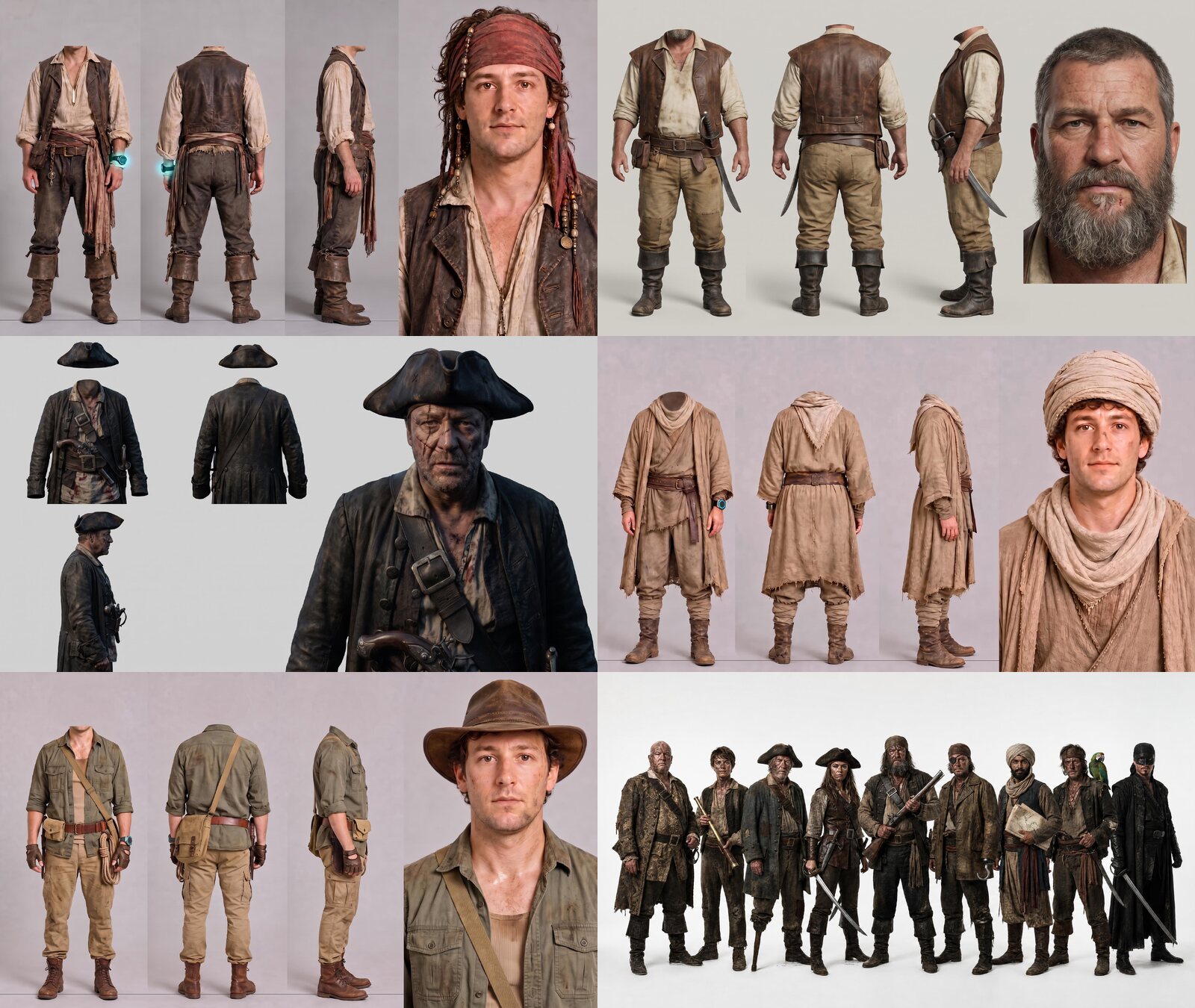
The character reference kit for the pirate captain, first mate, enemy captain, desert wanderer, jungle explorer, and pirate crew.

Generate several versions before locking a character. It is cheaper to solve the face, wardrobe, and proportions at the image stage than to discover those problems after generating video.

Part 2: Generate Location References

Once the character sheets are complete, build the locations for the film. This story moves through three worlds: a pirate ship, a desert, and a jungle.

Your video will only be as convincing as the references you provide. If a location image looks flat, illustrated, or poorly lit, the generated clip will usually inherit those problems. Create each environment as a wide establishing image with enough information for the model to infer new camera angles.

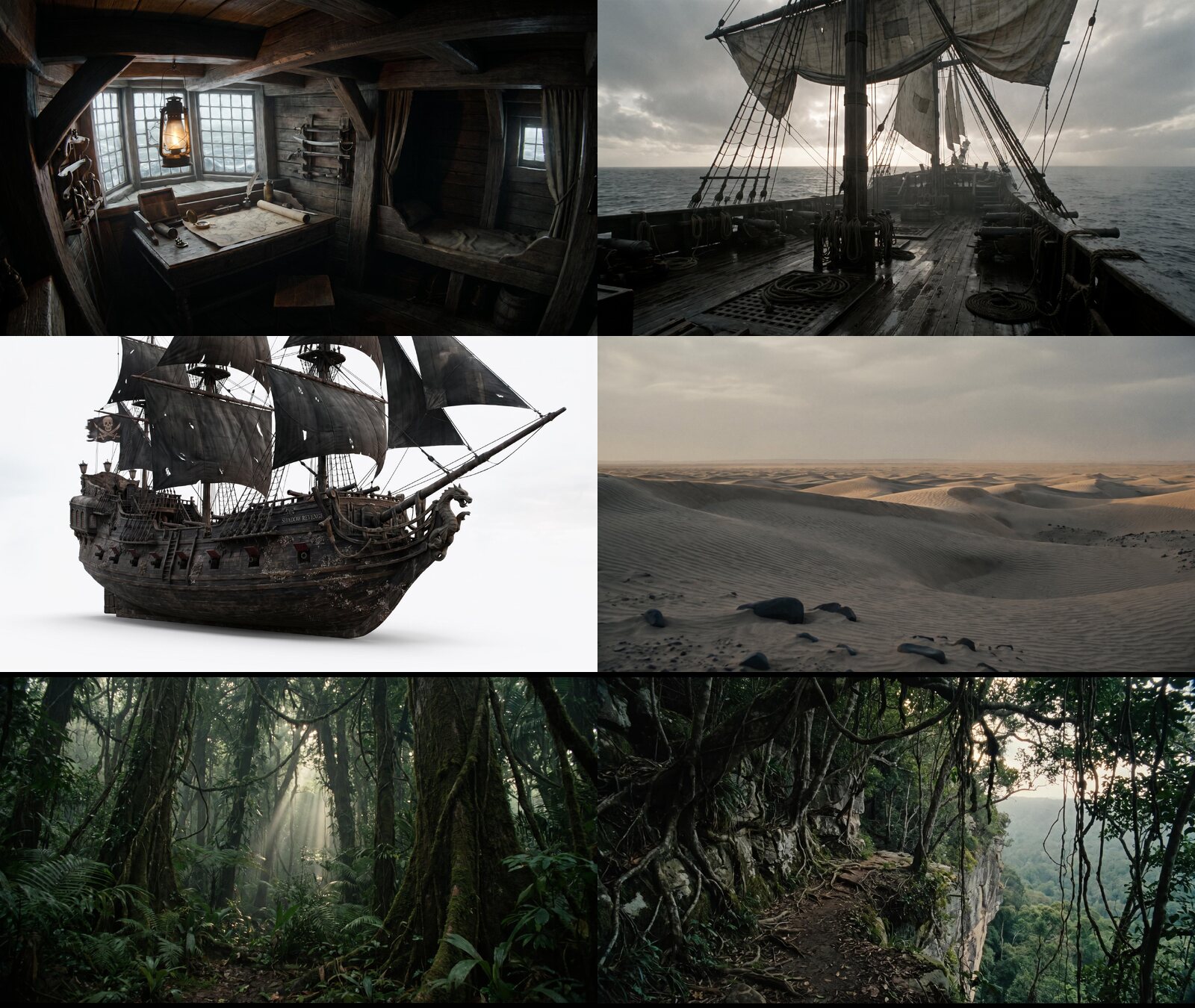
Pirate Captain's Cabin

Cinematic film still, wide shot of a pirate ship captain's cabin, three-quarter angle. Subject: A cramped wooden cabin below deck with a heavy carved desk, rolled sea chart, brass compass, swinging oil lantern, narrow berth built into the hull, weapon racks with cutlasses, and stern windows with leaded glass panes. Composition: Wide establishing angle from a low three-quarter position near the doorway. Ceiling beams and hull ribs frame a deep sightline toward the stern windows. Lighting: Weak gray daylight bleeding through the stern windows as the key source, warm lantern glow as a dim secondary accent, and heavy ambient shadow in the corners. Keep every shape readable. Style: Neutral desaturated palette of aged oak, iron, and faded canvas; IMAX ARRI Alexa cinema look; fine natural film grain; weathered wood and worn brass textures; moody but legible exposure.

Pirate Ship Deck

Cinematic film still, wide shot of a pirate ship's main deck, three-quarter angle. Subject: Weathered wooden planks, coiled rope, cannons lashed along the rail, patched sails overhead, the mainmast rising through frame, and rigging crossing the sky. Composition: Wide three-quarter angle from the stern looking toward the bow, with a low camera height so the masts and sails dominate the upper frame. The ocean horizon remains visible beyond the rail. Lighting: Overcast sky as a soft diffuse key, a faint rim along the rigging from a low sun behind clouds, and dense ambient shadow across the deck. Keep the ropes, sails, and hull readable. Style: Neutral gray-brown palette, salt-bleached wood and canvas, IMAX ARRI Alexa cinema look, fine film grain, a damp sheen on the planks, and restrained atmospheric haze at the horizon.

Open Desert

Cinematic film still, wide shot of an open desert landscape, three-quarter angle. Subject: Rippled sand dunes stretching to the horizon, wind-carved ridgelines, scattered wind-polished rocks in the foreground, and an empty pale sky. Composition: Wide three-quarter angle low to the sand. Dune ridgelines lead diagonally from the foreground toward a flat horizon, with generous negative space in the sky. Lighting: Hazy overcast light as a broad soft key, a subtle warm undertone along the dune crests, and deep ambient shadow in the troughs. Keep every ridgeline readable. Style: Neutral sand-gray palette with muted warm undertones, IMAX ARRI Alexa cinema look, fine film grain, wind-rippled sand texture, and faint heat haze softening the horizon.

Dense Jungle

Cinematic film still, wide shot of a dense tropical jungle interior, three-quarter angle. Subject: Towering hardwood trunks wrapped in vines, a tangled canopy, broad-leafed undergrowth, ferns across the ground plane, and a narrow gap of daylight in the distance. Composition: Wide three-quarter angle low in the undergrowth, with layered depth from foreground leaves to midground trunks and a hazy background clearing. Lighting: Filtered daylight breaking through the canopy in soft shafts, deep ambient shadow at ground level, and faint green bounce from the foliage. Keep the trunks and leaves readable. Style: Neutral desaturated green-brown palette, IMAX ARRI Alexa cinema look, fine film grain, damp bark and leaf textures, and light humidity haze in the deep background.

Jungle Cliff Path

Cinematic film still, wide shot of a narrow jungle cliff path, three-quarter angle. Match the environment, palette, and lighting of @jungle. Subject: A thin dirt ledge clinging to a rock face, tangled roots and vines hanging from the jungle above, and a sheer drop to dense canopy below the outer edge. Composition: Wide three-quarter angle from slightly above the path, looking along its curve into the distance with the drop-off visible on one side. Lighting: Filtered daylight through gaps in the canopy, deep ambient shadow along the rock wall, and faint green bounce from nearby leaves. Keep the path edge and drop readable. Style: Neutral gray-green palette, IMAX ARRI Alexa cinema look, fine film grain, damp packed-earth and root texture, and light haze over the distant canopy below.
The finished cabin, ship deck, enemy galleon, desert, jungle, and cliff references used to keep the film's locations consistent.

How to Prompt Realistic AI Locations

The most useful location prompts describe visible photographic choices rather than relying on a long list of quality words.

  • Ask for photorealistic, cinematic, naturally textured imagery grounded in real-world lighting.
  • Explicitly avoid cartoon, illustration, concept-art, and digital-painting treatments when realism matters.
  • Motivate the light with sources that could exist in the scene: sunlight, windows, lanterns, streetlights, fire, headlights, or practical interior lights.
  • Use a recognizable professional camera reference, such as an ARRI Alexa cinema look, to guide dynamic range, texture, and color response.
  • Keep wide establishing references readable in the shadows. A dark location can still preserve important spatial information.

You do not need to overload every prompt with technical specifications. Give the model a clear subject, composition, lighting plan, texture, and camera language, then stop.

Part 3: Generate the Video Clips

Do not try to generate the entire film in one pass. Treat every generation as a short scene with an explicit cast, environment, camera plan, action, dialogue, sound, and list of failure modes to avoid.

The references below complete the production kit: the hero's ship, the ostrich-mounted bandits, the oversized jungle monkeys, and the watch used for the final effect.
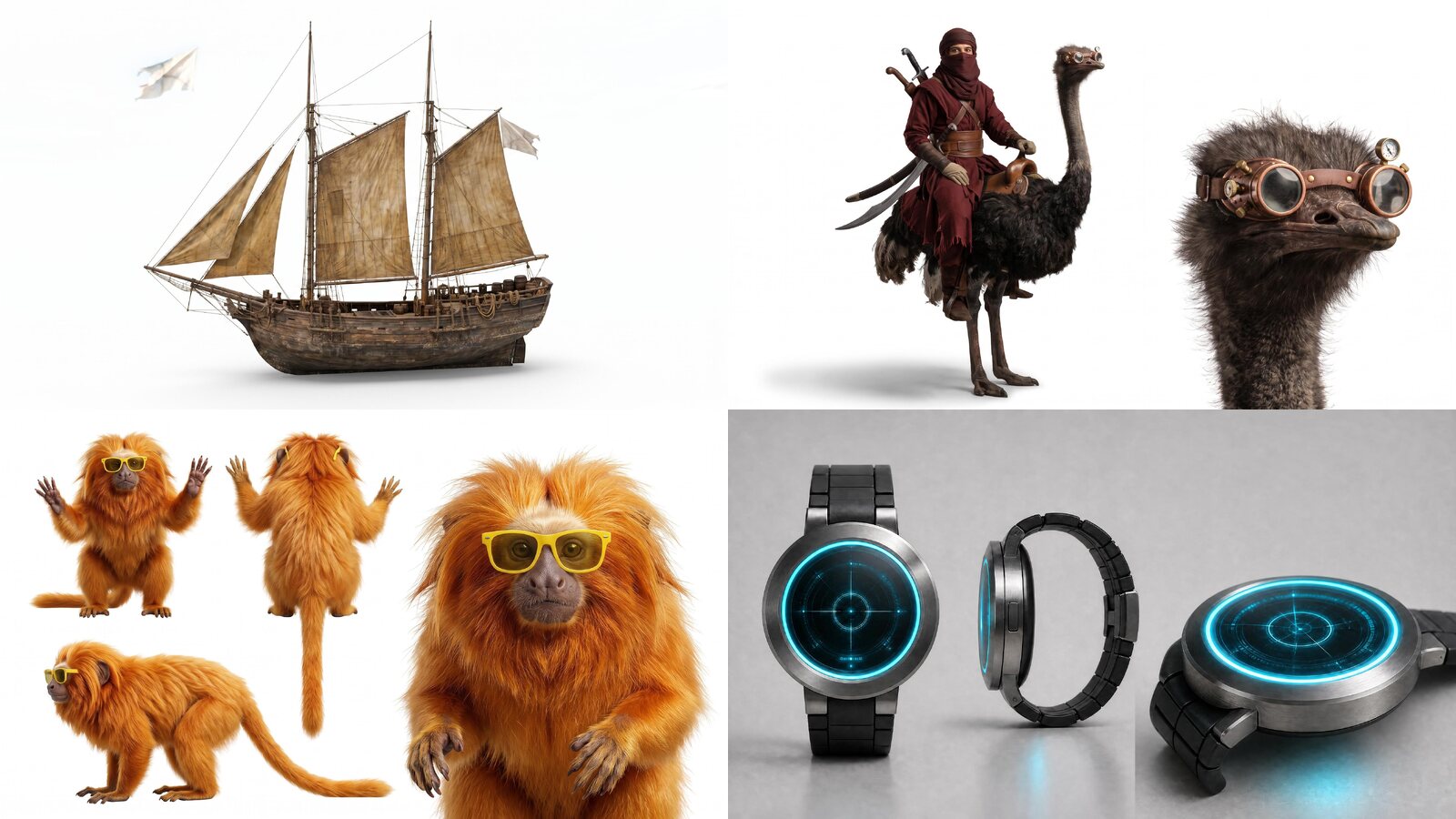
Reference images for the hero's ship, ostrich-mounted bandits, jungle monkeys, and glowing watch.

The prompts are templates. Replace the characters, props, and locations while preserving the structure, camera direction, lighting logic, movement, and timing.

Sequence 1: The Pirate Voyage

Scene 1: The Captain Finds the Island

Characters: The captain is the pirate from @pirate. Use his identity, wardrobe, and face only; ignore the glowing wrist device. A crewman appears only as a backlit silhouette. Scene: Use @cabin as the exact environment. The captain stands at the desk with the map, compass, and lantern. Style: IMAX ARRI Alexa look, vibrant color, filmic contrast, handheld camera, snappy hard cuts, three-quarter-angle coverage, and high-energy cinematography mixing wide, medium, and close shots. Audio: Room tone, creaking ship timbers, distant sea, the captain's dialogue, and the crewman's shout. Diegetic sound only; no music. Avoid: Static locked-off framing, slow drifting camera, or showing the wrist device. Timing: [0–3s] Wide three-quarter handheld shot of the captain studying the map. [3–6.5s] Hard cut to a low medium close-up as he traces a route. [6.5–8.5s] Tight close-up as his finger stops on an island and he says, gruffly and with satisfaction, “Gotcha.” [8.5–10.5s] The cabin door bursts open and a shaft of light reveals a crewman's silhouette. [10.5–12.5s] Low medium shot as the crewman shouts, “Captain, pirate sighted!” [12.5–15s] Wide handheld tracking shot as the captain sprints toward the door and the light.

Scene 2: Prepare for Battle

Characters: The captain is from @pirate. Use his identity, wardrobe, and face only; ignore the glowing wrist device. The first mate is from @assistant. The crew members are from @crew. Scene: Use @ship-deck as the exact deck environment: wet wooden planks, mast, coiled ropes, and cannons along the rail. The black galleon from @enemy-ship is far off on open water. Style: IMAX ARRI Alexa look, vibrant color, filmic contrast, handheld camera, snappy hard cuts, three-quarter-angle coverage, and strong physical motion in every shot. Dialogue: The captain shouts in a British accent, “Get ready to fight!” Audio: Wind, creaking rigging, distant surf, straining ropes, and crew shouting and moving fast. Diegetic sound only; no music. Avoid: Static framing, characters holding still, or a slow drifting camera. Timing: [0–3s] Wide handheld tracking shot as the captain bursts onto the deck and runs toward the rail. [3–5.5s] Medium three-quarter shot as he scans the horizon, turns, and shouts his order. [5.5–8s] Wide shot of the enemy galleon cutting through the waves. [8–10s] The first mate grabs a crewman by the shoulder and points him toward the cannons. [10–12s] Medium-close cut of crew hauling rigging ropes. [12–15s] Low medium shot as cannonballs roll into place and a cannon hatch slams open.

Scene 3: The Enemy Attacks

Characters: The enemy captain is from @enemy-captain. His crew are weathered pirates matching the same rugged style. Scene: Aboard the black-sailed galleon from @enemy-ship on the open ocean under overcast daylight. Style: IMAX ARRI Alexa look, vibrant color, filmic contrast, handheld camera, snappy hard cuts, three-quarter-angle coverage, and high-energy cinematography mixing wide, medium, and close shots. Dialogue: The enemy captain barks in a British accent, “Attack!” Audio: Wind, creaking timbers, waves, crew shouting, a cannon-fuse hiss, and a huge cannon blast. Diegetic sound only; no music. Avoid: Static framing, characters holding still, or a slow drifting camera. Timing: [0–2.5s] Tight handheld close-up as the enemy captain scans the horizon through a brass telescope. [2.5–4.5s] Close-up of his scarred face in the scope's shadow. [4.5–6.5s] Medium three-quarter shot as he snaps the telescope shut and shouts, “Attack!” [6.5–9s] Crew members sprint to the cannons and ram powder and shot into place. [9–11.5s] Low medium shot as the captain touches a lit match cord to the fuse. [11.5–13.5s] Wide shot of the violent muzzle flash and rolling smoke. [13.5–15s] Whip-fast close-up on his face lit by the blast as he grins.

Scene 4: The Captain Goes Overboard

Characters: The captain is from @pirate. The first mate is from @assistant. Scene: An overcast daytime sea battle. The enemy galleon from @enemy-ship fires at the captain's vessel from @hero-ship. Use @crew for the deck crew. Style: ARRI Alexa color science, motivated overcast daylight, underexposed but readable shadows, IMAX-scale widescreen framing, and visible film grain. Avoid: A night setting, artificial lantern-lit darkness, any glowing wrist device or science-fiction technology on the captain, and modern objects. Keep the scene period-accurate. Timing: [0–4s] Start on the enemy cannon firing, then track beside the cannonball in a fast low flight over dark churning water. [4–7s] Hard cut to the captain's deck. The first mate grips the wheel as the captain turns and shouts, “Brace!” [7–11s] The cannonball slams into the hull beside the wheel. Splintered wood, fire, and smoke throw the first mate and crew off their feet. [11–15s] The captain is hurled past torn sail and burning debris and crashes into the water as the ship burns behind him.

Sequence 2: The Desert Chase

Scene 5: A Hard Landing

Characters: The hero is from @wanderer. Scene: Use the dunes from @desert. Style: IMAX-grade ARRI Alexa cinema look, natural motivated lighting only, underexposed but readable exposure, visible 35mm film grain, and handheld camera work. Timing: [0–5s] An extreme low ground-level camera whips upward as the hero drops from roughly 2.5 meters overhead and slams into the sand, throwing a burst outward. [5–10s] Hold low and shaky as he lies stunned, coughs hard, and sheds sand. [10–15s] Slowly push closer from a low angle as he rises onto an elbow and scans the empty desert in confusion. Audio: Heavy impact, spraying sand, a rough cough, labored breathing, and faint desert wind. Avoid: Static camera or slow motion.

Scene 6: Reveal the Bandits

Characters: Three bandits mounted on ostriches, matching @bandits. Scene: Use the dunes from @desert. Style: IMAX-grade ARRI Alexa cinema look, natural motivated lighting, underexposed but readable exposure, visible 35mm film grain, snappy cuts, and a dynamic handheld camera. Timing: [0–3s] Fixed wide shot of an empty stretch of dunes with only sand and sky. [3–5s] Hard cut to a tight static frame as one goggled ostrich head suddenly enters from the side for a comic beat. [5–8s] Wide reveal of all three bandits far across the dunes. [8–12s] Low ground-level shot on the ostriches' clawed feet, then whip up as they burst into a sprint toward camera. [12–15s] Fast low handheld tracking shot beside the charging ostriches. Audio: Desert wind, one startled comic ostrich screech, and distant footfalls building into a running thunder. Avoid: A static hold during the run or slow motion.

Scene 7: Run

Characters: The hero is from @wanderer. The bandits are mounted on ostriches from @bandits, with scimitars drawn. Scene: Use the dunes from @desert. Style: IMAX-grade ARRI Alexa cinema look, natural motivated lighting, underexposed but readable exposure, visible 35mm film grain, snappy cuts, dynamic handheld camera, and high energy. Timing: [0–2s] Low close-up on the hero as the camera whip-pans to reveal the charging bandits. He says, panicked, “Oh shit, oh shit.” [2–4s] Wide shot as he scrambles up and bolts. [4–5s] Close-up of ostrich claws pounding the sand. [5–7s] Handheld tracking shot beside the running hero. [7–8s] Close-up of a scimitar cutting through the air. [8–10s] Front-facing shot of the hero's terrified face as he runs. [10–12s] Wide shot as the gap closes. [12–13s] His foot catches and he pitches into the dune. [13–15s] A wall of sand and dust swallows the ground-level lens to total black. Audio: Heavy footfalls, gasping breath, screeching ostriches, blade whooshes, a hard impact, and a dust roar fading to silence. Avoid: Static camera or slow motion.

Sequence 3: The Jungle Escape

Use the dust blackout as a transition between locations. It lets the next clip open in a completely different environment without asking one generation to solve the entire transformation.

Scene 8: Wake Up Upside Down

Characters: The explorer is from @explorer. Scene: In @jungle, the explorer hangs upside down by a rope with a spider on his face. Style: IMAX ARRI Alexa realism, natural motivated lighting, underexposed but visible shadows, heavy film grain, non-static handheld camera, and snappy dynamic cuts. Timing: [0–3s] Handheld close-up as he wakes with a sharp gasp, opens his eyes, and notices the spider. [3–6s] He slaps it away, shouts “Yaaa!”, and thrashes on the rope as the camera pushes quickly to a medium shot. [6–10s] The rope breaks and he crashes through the leaves. A fast handheld whip follows the fall to a low wide shot of him sprawled on the jungle floor. Audio: A shouted “Yaaa!”, rope snap, body crashing through foliage, a heavy landing, and jungle ambience. Avoid: Identity drift or a static camera during the fall.

Scene 9: The Monkey Chase

Characters: The hero is from @explorer. The pursuing monkeys are from @monkey and stand roughly one meter tall—larger and heavier than the proportions in the reference. Scene: The explorer lies on the floor of @jungle after his fall. Style: IMAX ARRI Alexa realism, natural motivated lighting, underexposed but visible shadows, heavy film grain, non-static handheld camera, and snappy dynamic cuts. Timing: [0–3s] Low handheld shot close on his chest and face as he breathes hard. [3–5s] His eyes snap toward a distant sound and the camera pushes toward his face. [5–7s] Wide shot down the trail as the hero gets up and a dozen monkeys appear far in the background. [7–11s] Chase from behind and slightly above the hero; he fills the near half of frame while the pack remains clustered in the distant half. [11–13s] Close handheld shot of his panicked glance backward while the monkeys remain tiny in the background. [13–15s] Wide side view as he runs into denser jungle with the pack still far behind. Audio: Rustling leaves, distant heavy monkey grunts and screeches, frantic footsteps, snapping branches, and breathless panting. Avoid: Monkeys entering the foreground, running beside or ahead of the hero, appearing small or cute, identity drift, or static camera.

Scene 10: The Tiger and the Cliff

Characters: The explorer is from @explorer and is still fleeing through the jungle. Scene: Begin in @jungle and finish on the cliff path from @cliff. Style: IMAX ARRI Alexa realism, natural motivated lighting, underexposed but visible shadows, heavy film grain, non-static handheld camera, and snappy dynamic cuts. Timing: [0–2s] Handheld tracking shot from behind as the explorer sprints through dense jungle and glances back. [2–4s] Low side angle as a huge tiger bursts from the undergrowth; he dodges sideways and keeps his footing. [4–7s] Fast low tracking shot as the tiger chases close behind him between the trees. [7–10s] Wide shot as he reaches the narrow cliff path, skids at the edge, checks the tiger, and looks down. [10–13s] Handheld whip follows him as he jumps while the tiger stops at the edge. [13–15s] The camera tips over the cliff and tracks his body falling into open air. Audio: Tiger roar and snarl, snapping branches, frantic footsteps, rushing wind, and jungle ambience. Avoid: Identity drift, swapping the positions of the tiger and hero, or static camera.

Scene 11: The Watch Escape

Characters: The explorer is from @explorer. He wears the glowing blue radar-style watch from @watch. Scene: The explorer free-falls above the jungle canopy after jumping from the cliff. Style: IMAX ARRI Alexa realism, natural motivated lighting, underexposed but visible shadows, heavy film grain, non-static handheld camera, snappy cuts, and a comedic tone. Timing: [0–4s] Handheld tracking shot follows him through the air with a slight rotation as he flails and shouts, “Whoaaa!” and “Oh no, no, no!” [4–6s] Quick push to his arm as he struggles to press the watch button mid-tumble. [6–8s] His body flickers electric blue, flashes, and vanishes with a sharp pop, leaving only his hat spinning in the air. [8–11s] The camera follows the empty hat as it tumbles toward the canopy. [11–15s] Continue to the jungle floor as the hat lands softly on the leaves; no person is visible. Audio: Rushing wind, panicked comic shouting, a sharp electronic-magical whoosh and pop, the fluttering hat, a soft landing, and jungle ambience. Avoid: The hero reappearing after the flash, identity drift before the disappearance, a watch design that differs from @watch, or static camera.

Generate more than one version of the most important scenes. A take with the best camera move may have a weak face, while another may have a perfect performance but an unusable ending. During the edit, you can combine the strongest fragments from both.

Part 4: Edit the Film

Bring every generated clip into your editing software and treat it as raw footage, not as a finished scene.

Build the Sequence From the Best Moments

Split each generation into individual shots, remove broken or inconsistent frames, and arrange the strongest moments around story, pacing, continuity, and emotion.

Alternate wides, medium shots, close-ups, and inserts. If an important beat is missing, generate only that insert instead of recreating the full scene. A reaction, prop close-up, impact, environmental cutaway, or transition can often solve the edit at a fraction of the cost.

The blackout created by the desert dust gives the film a clean transition into the jungle. The final falling hat gives the last scene a visual endpoint after the hero disappears. Planning those transition images inside the generation prompts makes the edit easier later.

Finish Sound After the Picture Works

Use the model's diegetic audio where it is clean, then rebuild weak or inconsistent moments with sound effects. Keep dialogue intelligible and use ambience to connect cuts recorded in different generations.

Once the picture edit is stable, ask Yapper Assistant to develop an original score that follows the film's changing locations and comic-adventure tone.

Create an original cinematic adventure soundtrack for a short film that moves from a tense pirate battle to a comic desert chase and then a dangerous jungle escape. Begin with restrained nautical percussion and low strings, accelerate into playful rhythmic motion in the desert, and finish with urgent jungle percussion and a light comic release. Build smooth transitions between sections, leave room for dialogue and sound effects, and do not imitate an existing film score or composer.

The full post-production loop is simple:

Generate, split, remove, rearrange, add missing inserts, rebuild sound, and polish.

Create Your Own AI Short Film

The same workflow works for adventure films, trailers, comedy sketches, product campaigns, music videos, historical stories, and short-form series.

Start with a simple story, solve consistency in pre-production, generate short controllable scenes, and treat every output as production material rather than a finished result.

Ready to create your own short film?

Use Yapper Assistant to develop the script and reference kit, then turn each scene into a controllable AI video clip.